xcdatamodel でデータモデルを定義
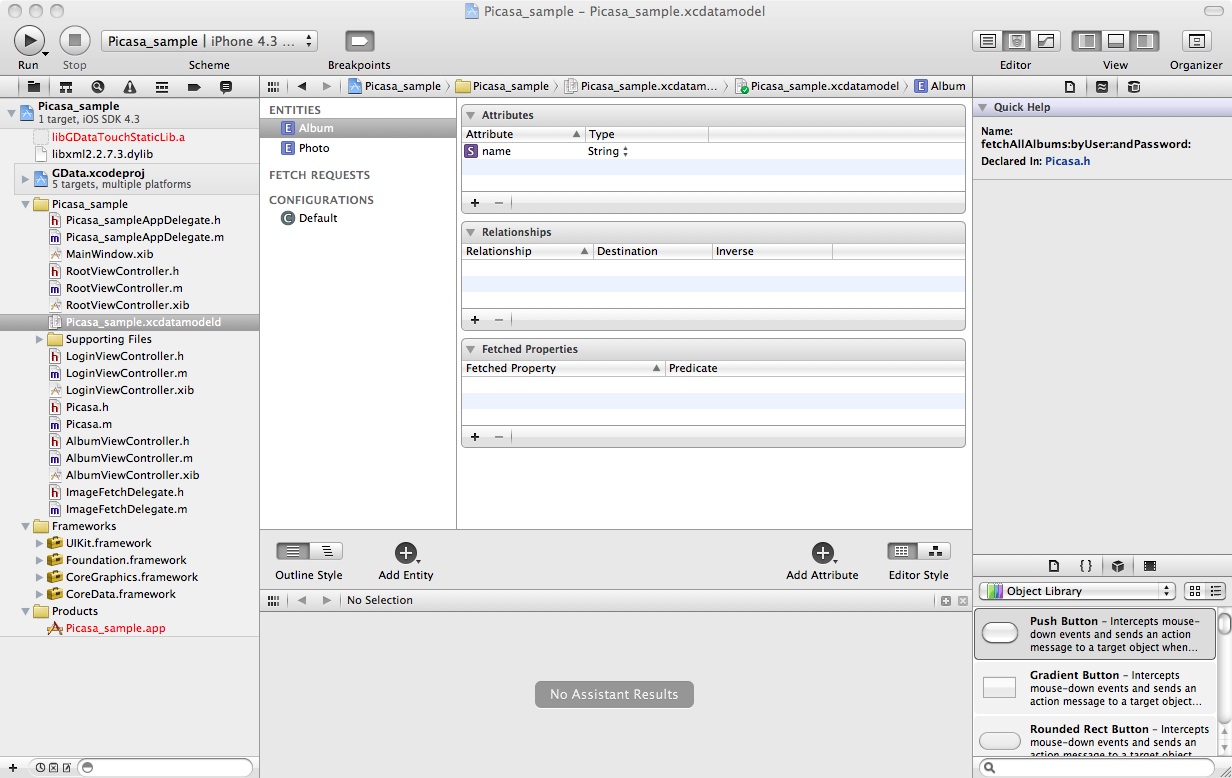
xcdatamodelにデータモデルを定義
TableViewControllerもこれにあわせて変更
まずは、Viewに関連付けるEntityを指定
- (NSFetchedResultsController *)fetchedResultsController
{
    if (__fetchedResultsController != nil)
    {
        return __fetchedResultsController;
    }

    /*
     Set up the fetched results controller.
    */
    // Create the fetch request for the entity.
    NSFetchRequest *fetchRequest = [[NSFetchRequest alloc] init];
    // Edit the entity name as appropriate.(*defined in xcdatamodel)
    NSEntityDescription *entity = [NSEntityDescription entityForName:@"Album" inManagedObjectContext:self.managedObjectContext];
    [fetchRequest setEntity:entity];

    // Set the batch size to a suitable number.
    [fetchRequest setFetchBatchSize:20];

    // Edit the sort key as appropriate.(*defined in xcdatamodel)
    NSSortDescriptor *sortDescriptor = [[NSSortDescriptor alloc] initWithKey:@"name" ascending:NO];
    NSArray *sortDescriptors = [[NSArray alloc] initWithObjects:sortDescriptor, nil];

    [fetchRequest setSortDescriptors:sortDescriptors];

    // Edit the section name key path and cache name if appropriate.
    // nil for section name key path means "no sections".
    NSFetchedResultsController *aFetchedResultsController = [[NSFetchedResultsController alloc] initWithFetchRequest:fetchRequest managedObjectContext:self.managedObjectContext sectionNameKeyPath:nil cacheName:@"Root"];
    aFetchedResultsController.delegate = self;
    self.fetchedResultsController = aFetchedResultsController;

    [aFetchedResultsController release];
    [fetchRequest release];
    [sortDescriptor release];
    [sortDescriptors release];

    NSError *error = nil;
    if (![self.fetchedResultsController performFetch:&error])
        {
        /*
         Replace this implementation with code to handle the error appropriately.

         abort() causes the application to generate a crash log and terminate. You should not use this function in a shipping application, although it may be useful during development. If it is not possible to recover from the error, display an alert panel that instructs the user to quit the application by pressing the Home button.
         */
        NSLog(@"Unresolved error %@, %@", error, [error userInfo]);
        abort();
    }

    return __fetchedResultsController;
}
次にセルデータの表示のためのコードを編集
// Customize the appearance of table view cells.
- (UITableViewCell *)tableView:(UITableView *)tableView cellForRowAtIndexPath:(NSIndexPath *)indexPath
{
    static NSString *CellIdentifier = @"Cell";

    UITableViewCell *cell = [tableView dequeueReusableCellWithIdentifier:CellIdentifier];
    if (cell == nil) {
        cell = [[[UITableViewCell alloc] initWithStyle:UITableViewCellStyleDefault reuseIdentifier:CellIdentifier] autorelease];
    }

    // Configure the cell.
    [self configureCell:cell atIndexPath:indexPath];
    return cell;
}
- (void)configureCell:(UITableViewCell *)cell atIndexPath:(NSIndexPath *)indexPath
{
    NSManagedObject *managedObject = [self.fetchedResultsController objectAtIndexPath:indexPath];
    cell.textLabel.text = [[managedObject valueForKey:@"name"] description];
}
TableView の ManagedObjectContextにデータを設定する
このコードはTableViewの外でもよい。ここで、mFetchedResultsController は、TableViewの fetchedResultsController で取得した NSFetchedResultsController 。
既存データをクリア
Entity毎にクリアできるメソッドが見つからなかったので、1つずつ削除してみた。
    //clear existing data
    NSArray *fetchedObjects = [mFetchedResultsController fetchedObjects];
    NSEnumerator *enumerator = [fetchedObjects objectEnumerator];
    NSManagedObject *object;
    while ((object = [enumerator nextObject])) {
        [[mFetchedResultsController managedObjectContext] deleteObject:object];
    }
データをInsertする。
            //
            // insert into managedObjectContext
            //
            // Create a new instance of the entity managed by the fetched results controller.
            NSManagedObjectContext *context = [mFetchedResultsController managedObjectContext];
            NSEntityDescription *entity = [[mFetchedResultsController fetchRequest] entity];
            NSManagedObject *newManagedObject = [NSEntityDescription insertNewObjectForEntityForName:[entity name] inManagedObjectContext:context];

            [newManagedObject setValue:title forKey:@"name"];

            // Save the context.
            NSError *error = nil;
            if (![context save:&error])
            {
                /*
                 Replace this implementation with code to handle the error appropriately.

                 abort() causes the application to generate a crash log and terminate. You should not use this function in a shipping application, although it may be useful during development. If it is not possible to recover from the error, display an alert panel that instructs the user to quit the application by pressing the Home button.
                 */
                NSLog(@"Unresolved error %@, %@", error, [error userInfo]);
                abort();
            }
            //
persistentStoreCoordinatorでエラーになるとき
データモデルを変更した後、AppDelegate の persistentStoreCoordinatorでエラーになるときは、自動生成されるコメントに書いてあるように、一度既存のデータファイルを削除してみる。
//deleting the existing store
 [[NSFileManager defaultManager] removeItemAtURL:storeURL error:nil];
 スマホアプリの自習帳
コメントを残す